What arrives
An editable Resolve timeline, cut for cut, with the original media linked.
- Picture
- Every clip on every video track, in its stacking order.
- Framing
- Position, scale, rotation, crop, opacity, static and keyed, and flips. Scale to Frame Size is read from the project and Resolve's mismatched-resolution setting is set to match, so a 4K shot in an HD timeline keeps the framing you cut.
- Blend modes
- All of Premiere's blend modes.
- Nested sequences
- As nested timelines you can open, or opened out as flattened clips, whichever you choose.
- Multicam
- Each multicam clip arrives as the angles you cut, so every switch is an ordinary cut.
- Timing
- Constant speed changes, reverse, freeze frames, and footage at another frame rate. Speed ramps and time remapping arrive with their full retime curve, flagged so you can play them against the reference.
- Transitions
- Cross dissolves and dips to black and to white. Morph Cut arrives as Smooth Cut. Any other transition arrives as a dissolve of the same length, and the results page names it.
- Titles and graphics
- Titles rebuilt as live text, color mattes as Resolve generators, and adjustment layers as Resolve adjustment clips, with their effects listed to rebuild. Other graphics and MOGRTs arrive as labeled placeholders that hold their place.
- Sound
- Every audio track with its channel routing, crossfades, and clip volume, static and keyed.
- Captions
- As subtitle tracks.
- Markers and flags
- Your markers on the timeline, plus a marker and a clip color on each clip the results page flags, naming what to check.
- Reference render
- On its own track, to play against the conform.
- Media
- A missing file arrives offline in Resolve, ready to relink. With trimmed media on, the package carries only the frames the edit uses, plus handles.
- Your choices
- The switches under the timeline leave out audio, graphics, titles, adjustment layers, solids, placeholders, or markers, join through cuts, collapse the video tracks, or open nests out as flattened clips.
What to check
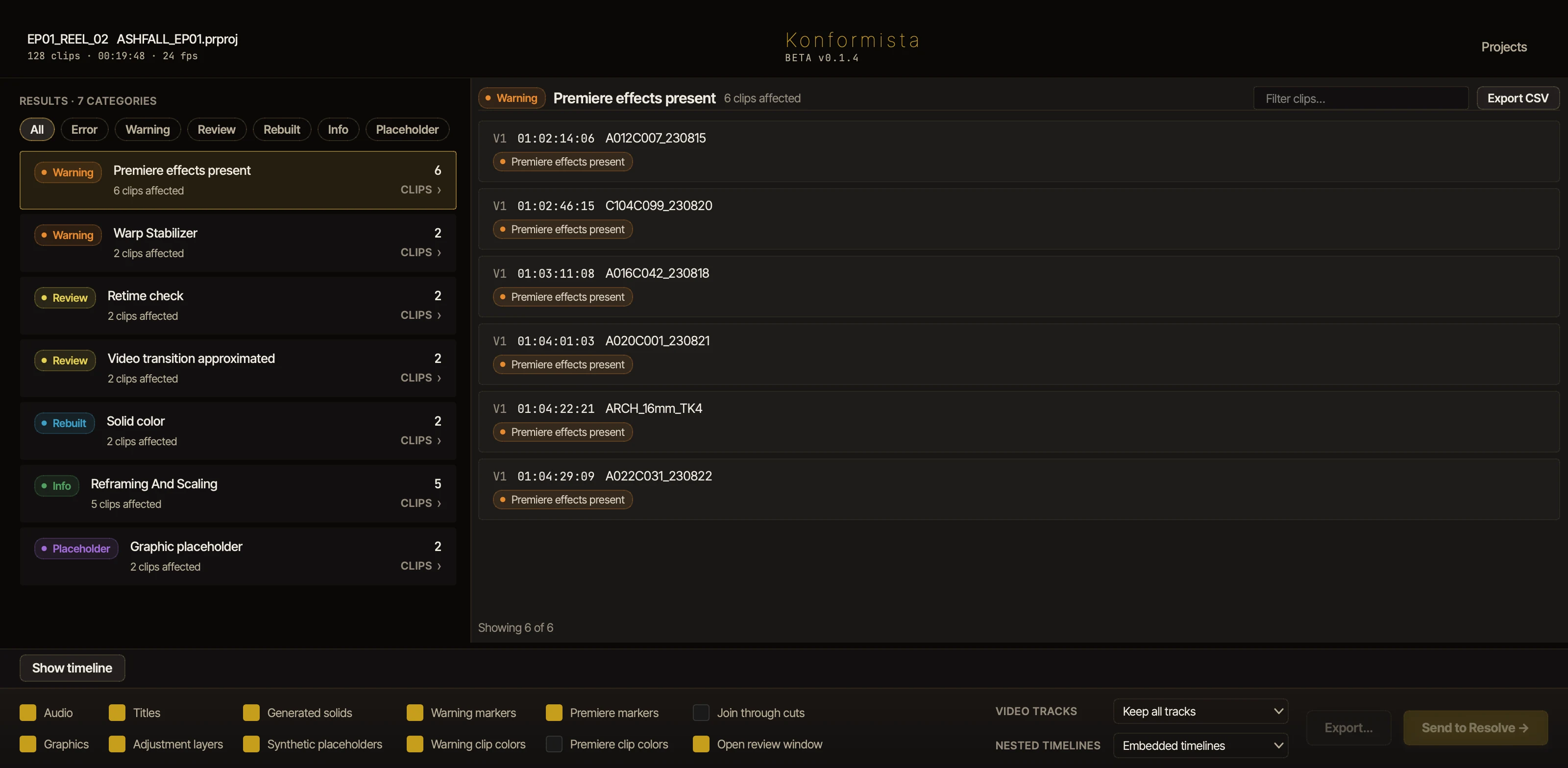
The results page sorts every flag into six severities, from Error to Placeholder, each with what it means and what to do. The full list of flags.
In Resolve, the Review window lists the same clips. Click one and Resolve's playhead lands on it; tick it reviewed and its marker and clip color clear from the timeline.
How the send works
Drop the project
Drop a .prproj on the Project Hub and choose the sequence. Premiere doesn't need to be installed.
Read the results
Every clip is checked against what Resolve will carry, with what to do about each flag.
Send or export
Send to Resolve builds the timeline in a new project or the one Resolve has open, on this machine. Or export a .konform, and the colorist imports it with the free Konformer.
Work through the flags
In Resolve, the Review window lists every flagged clip, so the conform is also a check of the cut.
The grade back to Premiere
Turn on the Premiere roundtrip before you send. Sent to Resolve on this machine, the graded Premiere project is written with the send, and each shot is graded on a trimmed copy of its own: the project plays graded as Resolve's renders land. For a colorist elsewhere, export the roundtrip package, then drop their delivery on the Project Hub and Konformista writes the graded project. Your edit, effects intact, on graded picture. Each pass is versioned, so a second grade never overwrites the first.
Requirements
- DaVinci Resolve
- Resolve 18 or later. Resolve Studio for the full conform and for Send to Resolve; with Resolve Free, export a .konform and import it with Konformer.
- Konformista
- macOS 13 or later on Apple silicon, 64-bit Windows, or Linux: Rocky Linux 8 and 9, and Ubuntu 20.04 and later.
- Premiere
- Projects from version 14 on. Premiere doesn't need to be installed.
- License
- Konformista for DaVinci Resolve: €490 a year on the Freelance plan (one person, one computer), or €990 a year per seat on the Team plan, excluding VAT, 30% off from the third Team seat. Try it free for 7 days.
Questions
Can DaVinci Resolve open a Premiere project?
Not directly: Resolve doesn't read .prproj files. You either export an XML or AAF from Premiere, or use a tool that reads the project file itself. Konformista reads the project file, and Premiere doesn't need to be installed on the machine running the conform.
Why do speed ramps break when I import a Premiere XML into Resolve?
Time remapping lives in the Premiere project as keyframes. The XML export approximates them, Resolve then reads that approximation into its own retime model, and the errors add up to wrong frames on screen. Konformista reads the original keyframes and rebuilds the full retime curve in Resolve, then flags the clip so you can play it against the reference.
Why is my multicam offline after an XML import into Resolve?
A Premiere multicam clip is a nested sequence underneath, and the XML hands Resolve a reference it can't follow. The usual workaround is flattening every multicam clip by hand before the export. Konformista does it for you: each section becomes the angle that was live, so the switches arrive as ordinary cuts.
Why are my shots punched in or wrongly framed after an XML import into Resolve?
Premiere's Scale to Frame Size fits the clip invisibly: its Scale still reads 100%, so the XML carries no record of the fit, and Resolve applies its own mismatched-resolution setting on top. 4K shots in an HD timeline land punched in or reframed. Konformista reads the fit from the .prproj itself and sets Resolve to match. Any clip whose framing had to be worked out is flagged for a check against the reference.
How do I get the Resolve grade back into Premiere?
Turn on the Premiere roundtrip before you send. Sent from this machine, the graded .prproj is written with the send and plays graded once Resolve's renders land. For a colorist elsewhere, drop their delivery on the Project Hub and Konformista writes it. Same edit, same effects and audio, graded picture. Each pass is versioned, so a second grade never overwrites the first.
Do I have to send the camera originals to the colorist?
No. With trimmed media on, the .konform package carries only the frames the edit uses, plus handles, with the same file names and timecode. Konformer unpacks ordinary online media at the other end. Stills, graphics, and anything it can't trim safely travel whole.
Does this need DaVinci Resolve Studio?
Resolve Studio is needed for the full conform and for Send to Resolve. With Resolve Free, export a .konform and Konformer imports it as an XML you finish by hand. Either way: Resolve 18 or later, on macOS, Windows, or Linux.
When is a plain XML good enough?
A cuts-only timeline at a single frame rate, with no nests, retimes, or multicam, travels fine as XML. Konformista writes a plain .xml for exactly that case.
How much does it cost?
Konformista for DaVinci Resolve is €490 a year on the Freelance plan (one person, one computer), or €990 a year per seat on the Team plan, excluding VAT, 30% off from the third Team seat. After the trial the preflight report stays free. Try it free for 7 days: download the app and sign in with your email, no card needed.